See it in action
This is the actual app
Real screens from the demo café, running on a year of sales — no mockups. This is what walking in looks like.
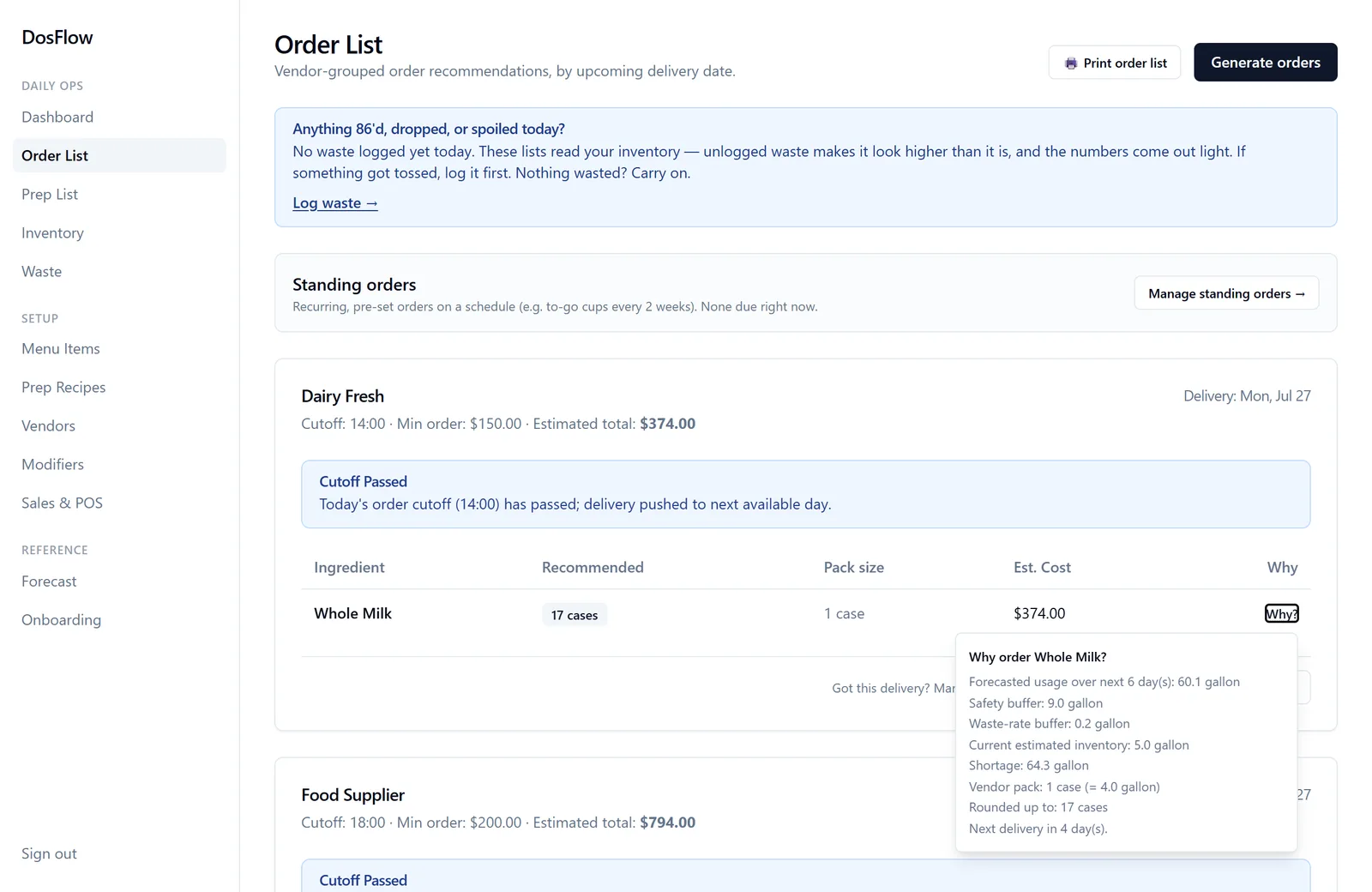
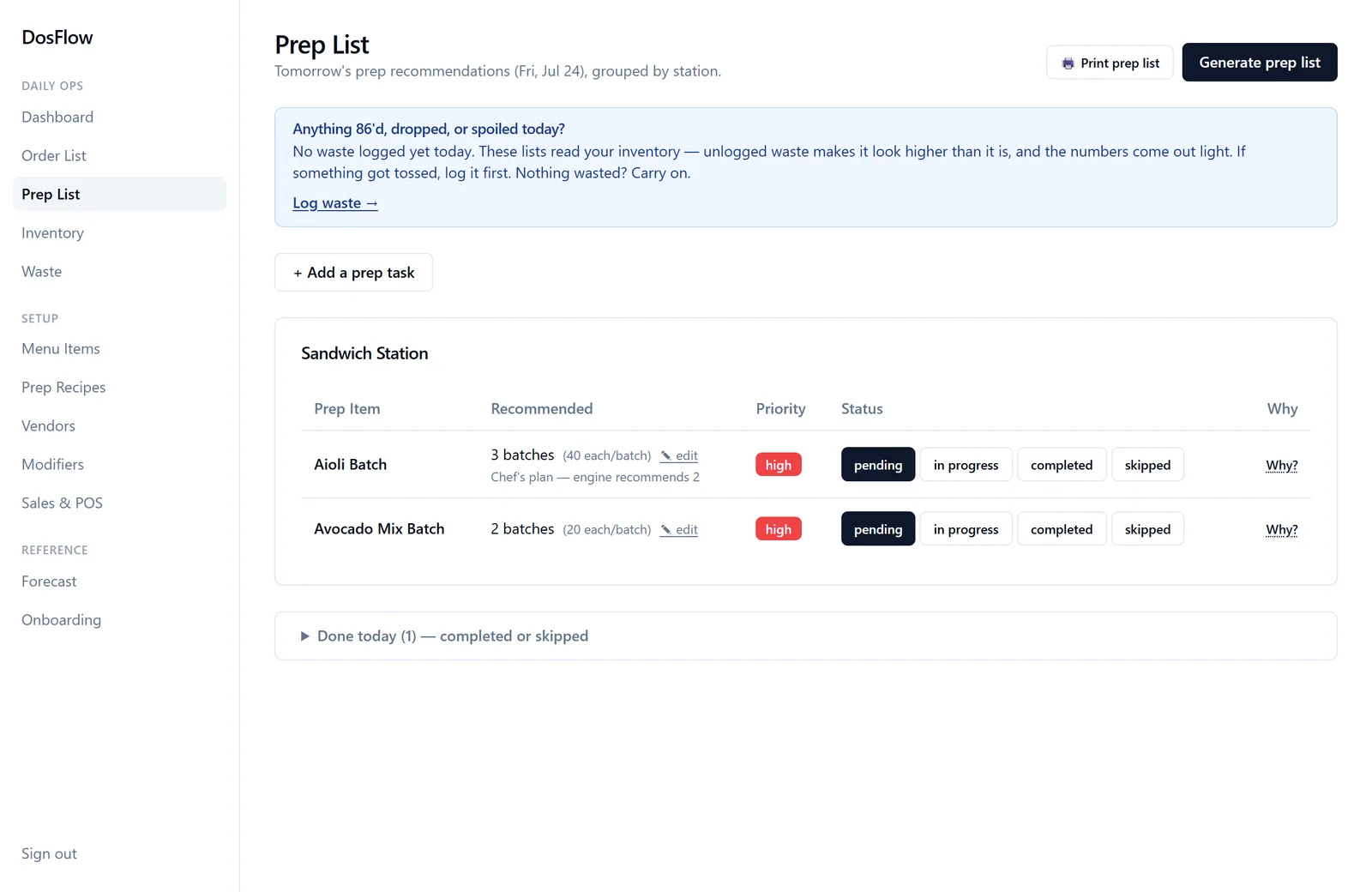
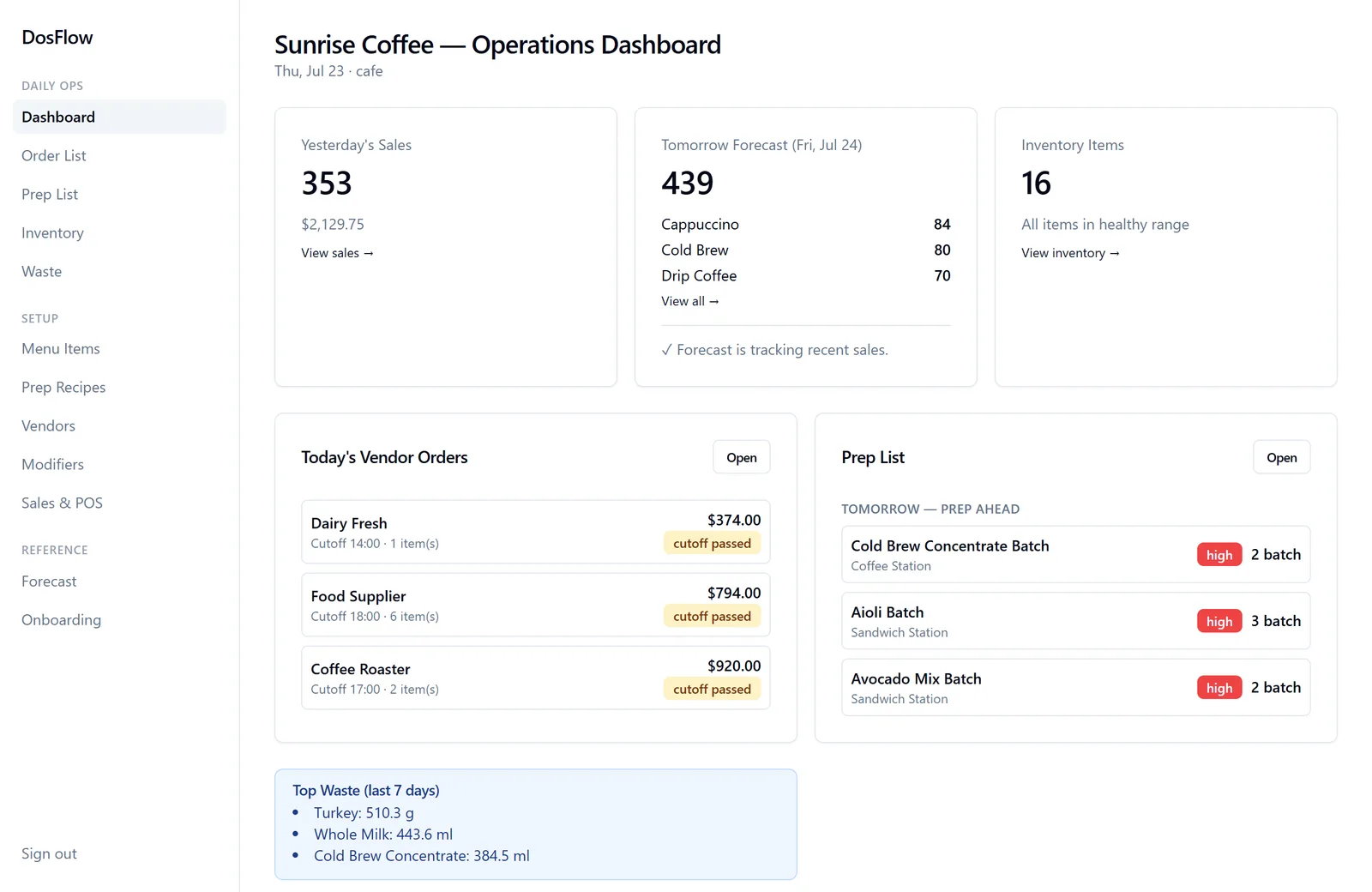
DosFlow reads your sales and writes tomorrow's order list and prep list — so your team walks in to clarity instead of chaos. Starting at the two lists every kitchen runs on.
| Ingredient | Order | Est. | |
|---|---|---|---|
| Espresso Beans | 2 bags | $160 | Why? |
| Coffee Beans | 1 bag | $50 | Why? |
| Whole Milk | 6 gal | $36 | Why? |
| Oat Milk | 2 cases | $58 | Why? |
No implementation weeks. No consultants. You can be live before tonight's service.
Photograph your invoices, recipes, and menu. DosFlow reads them and builds your ingredients, vendors, and recipes — no data entry marathon.
Square connects in one click today, and more popular POS integrations are on the way. On a different system? A one-minute daily sales export from your POS keeps DosFlow fully working in the meantime.
DosFlow forecasts your week from your own sales patterns, then turns it into tomorrow's order list per vendor — pack sizes, cutoffs, minimums — and a prep list per station with batch counts and rollover.
Real screens from the demo café, running on a year of sales — no mockups. This is what walking in looks like.
Chefs don't trust magic numbers — and they shouldn't. Every line on every list carries its own "why": the forecast behind it, what's on your shelf, what's already on a truck. Tap it, read it, overrule it. You're the chef; DosFlow does the math.
Most kitchens run blind past tomorrow. DosFlow reads your own history — day-of-week patterns, trends, last year's season — and shows you next week before it happens. Both lists are built on that forecast, and every number stays yours to overrule.
Never get caught mid-service again. The order list knows your vendors' cutoffs and delivery days, so the safety stock is there before you need it.
Ask anyone who's worked the line: people rarely burn out from cooking. They burn out from chaos — the 86'd items mid-rush, the guess-work prep, the 6am math on a clipboard. Clarity lowers stress, and calm kitchens keep their people. That's the real product. The lists are just how it's delivered.
The big platforms were built for accounting departments. DosFlow was built for the pass.
| DosFlow | Restaurant365 | MarketMan | MarginEdge | |
|---|---|---|---|---|
| Monthly price | $99* | $400–600+ | $199–249 | $350 |
| Setup fee | None | $3,000–15,000 | Varies | None |
| Contract | Monthly — cancel anytime | Annual | Annual | Month-to-month |
| Time to live | Same day | Weeks | Days–weeks | Days–weeks |
| Onboarding from photos | ✓ | — | — | Invoice scans |
| Explains every recommendation | ✓ | — | — | — |
| Daily prep list per station | ✓ | — | — | — |
*Founders' rate for your first year after launch. Beta kitchens get their first year free.
Competitor pricing as publicly listed or reported, 2026. Verify current pricing with each vendor.
Hi! My name is Carlos — I'm the founder of DosFlow. I'm not a software guy, and I'm not a Silicon Valley tech bro; I'm a line cook. I've been behind the fire, in the trenches, lost in the weeds. I've done the 6am walk-in count with a clipboard, guessed the prep, watched the 86's pile up on a Friday night. I've seen the chaos push good cooks out of kitchens they loved.
After 15+ years on the line I noticed a pattern: I never quit restaurants because of the cooking — that part I still love. I quit because of broken systems — pen-and-paper chores that eat time you don't have and pull your mind away from the main thing: cooking.
That's why I built DosFlow, the tool I wanted on the line: it does the office work — the counting, the ordering math, the prep planning — so the kitchen can just cook (and crack jokes while they're at it). I hope it takes some of that built-up stress and frustration off your shoulders — it's what I wanted most when I was on the line, and it's what I want it to do for you. Built with care, tested in a real shop, priced like a tool. See you at the after-shift bar.
— Carlos Jara Perez
It reads your sales history and writes the two lists every kitchen runs on: tomorrow's order list — per vendor, in your vendors' pack sizes, with cutoffs and minimums — and tomorrow's prep list per station, with batch counts and rollover. Every number carries a "why" you can tap and read. You review, adjust, and go cook.
Square connects in one click today. On another system — Toast, Clover, SpotOn, anything that can export sales? A one-minute daily sales export from your POS keeps DosFlow fully working while more integrations get built. Tell us your POS in the waitlist form — that's literally how we decide which integration comes next.
Sales only, and read-only. You connect through Square's own login page — DosFlow never sees your password, can't touch money, and can't change anything in your Square account. You can disconnect it with one click, anytime.
A couple of hours of one-time setup, not weeks. You photograph your invoices, recipes, and menu; DosFlow reads the pictures and builds your ingredients, vendors, and recipes; you connect your sales and review what it built. Most kitchens can be live the same day they start.
Beta kitchens get their first year free — published right here, not a hidden deal. After that, the founders' rate is $99 a month, month to month, cancel whenever. No setup fee, no contract, no "call us for pricing."
You shouldn't — not blindly. That's why every line carries its own "why": the forecast behind it, what's on your shelf, what's already on a truck. Read it, and if your gut says different, overrule it. The lists get sharper as more of your sales flow in, and you stay the chef the whole time.
Cancel anytime — it's monthly, there's no contract. If you go, your data goes too: we delete it on request and confirm it in writing. Your recipes and your numbers are yours, full stop.
This site is in both languages, and DosFlow already reads recipes and invoices written in Spanish. The app screens themselves are in English today — Spanish is on the roadmap as a priority, not a footnote. If you run a Spanish-first kitchen, join the waitlist and say so: it moves that work up the list.
We're onboarding a few kitchens at a time, personally. Leave your email and we'll reach out when a spot opens up.
No spam. No contracts. Just a heads-up when it's your turn.
✓ You're on the list — we'll be in touch soon.